D
devie
Guest
- Thread Author
- #1
AI tools for creating Consistent characters and illustrations help designers develop the same character across different poses, expressions, scenes, and art styles. These tools are useful for children’s books, comic illustrations, game assets, storyboards, animation concepts, and social media content.
The main challenge is keeping a character recognizable in every image. An AI image generator might create a great character in the first illustration, but change the hairstyle, clothing, facial features, or body proportions in the next one. Reference images, reusable character elements, and custom-trained models can help reduce these differences.
For graphic designers, illustrators, and digital artists, choosing the right tool depends on the project. Some tools are easy to use for generating illustrations from prompts, while others provide more control over character identity and visual style. You can also explore our guides to AI design tools and AI tools for image upscaling and photo enhancement to build a more complete creative workflow.
Unlimited Downloads
Download Now
In this guide, we look at 15 AI tools for creating Consistent characters and illustrations, including their features, Pros, Cons, and best uses.
Before choosing a tool, Consider how you plan to use your characters. A tool for creating one mascot is not necessarily the best option for producing 30 illustrated pages for a children’s book.
In this collection of AI tools use reference images to guide each new generation. Others support reusable character elements or custom model training. Adobe Firefly, for example, has an Elements feature designed to reuse Consistent subjects, characters, and objects across projects. This feature is currently described by Adobe as a beta experience.

Midjourney is a strong option for designers who want visually rich characters, concept art, and stylized illustrations. Its reference features help guide new generations using an existing character image and visual style. Results can still vary, especially when changing poses, camera angles, or clothing.
Features:
Pros:
Cons:
Best for: Concept artists, fantasy illustrators, and visual development.

Leonardo AI offers image generation and reference-guided workflows for developing characters, game assets, and digital illustrations. Its image guidance features help maintain similarities to a supplied reference. Custom model training options can also help creators build a repeatable visual style.
Features:
Pros:
Cons:
Best for: Game designers, concept artists, and digital illustrators.

Adobe Firefly is useful for creating and refining illustrations within an Adobe-focused design workflow. Its reference-image features help guide image structure and artistic style. Adobe’s newer Elements feature is specifically intended to reuse Consistent characters and other subjects across multiple scenes.
Features:
Pros:
Cons:
Best for: Brand illustrations, marketing graphics, and Adobe users.

ChatGPT image generation and editing capabilities can help create an original character, develop its appearance, and produce new illustrations from reference images. You can describe details such as eye color, clothing, expression, and scene, then request changes while asking the model to preserve the character’s defining features.
Features:
Pros:
Cons:
Best for: Story illustrations, character concepts, and quick creative experiments.

Recraft is worth Considering when you need clean vector-style illustrations, iCons:, mascots, and graphic assets. A shared visual style and a clear character reference can help you build a family of related illustrations for a website, publication, or brand.
Features:
Pros:
Cons:
Best for: Brand mascots, vector illustrations, and graphic design assets.

Scenario focuses on AI-generated assets for game development and related creative projects. Its model-training and asset-generation workflows can help teams develop artwork that follows a defined visual direction rather than starting from a different style every time.
Features:
Pros:
Cons:
Best for: Game studios, indie developers, and asset creators.
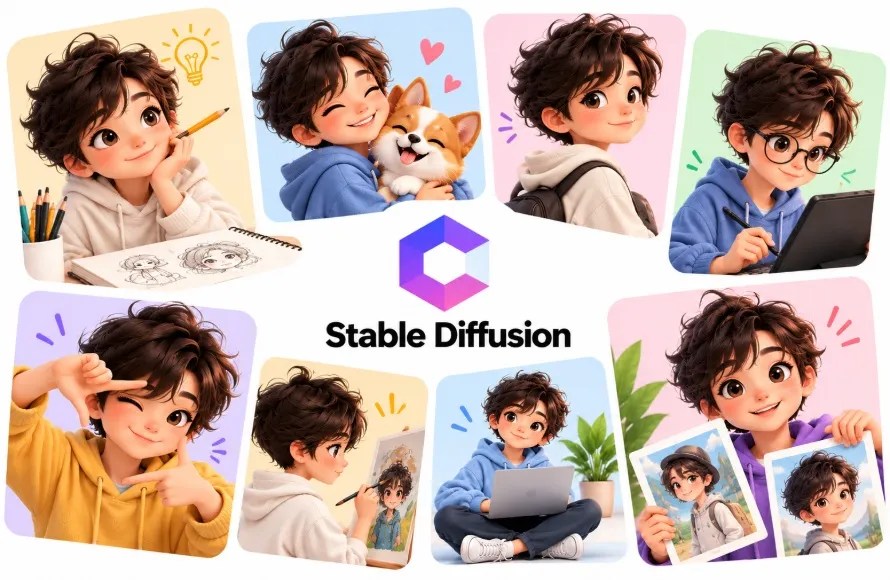
Stable Diffusion offers a flexible approach to character illustration, especially when paired with custom models, LoRA training, and reference-control extensions. Instead of relying only on text prompts, creators can build a workflow around a specific character and repeat it across many images.
Features:
Pros:
Cons:
Best for: Advanced illustrators who want detailed control.

ComfyUI is a node-based interface for building custom AI image-generation workflows. It is not a single image model. Instead, it connects compatible models and tools, allowing creators to combine reference images, pose controls, inpainting, and custom character models.
Features:
Pros:
Cons:
Best for: Technical artists and creators building custom pipelines.

Krea AI is useful for visual exploration, image generation, and refining creative concepts. Designers can develop a character’s appearance, test different looks, and work toward a Consistent visual direction. Check the current model and reference controls available in your account before choosing it for a long character series.
Features:
Pros:
Cons:
Best for: Illustrators exploring character styles and concepts.

OpenArt brings together AI art generation and creative workflows that can help users create and refine recurring characters. Depending on the available model and feature set, creators can use reference images, character workflows, and image editing to produce related illustrations.
Features:
Pros:
Cons:
Best for: Artists who want to compare different AI workflows.

Ideogram is known for image generation used in graphic design and visual content. It can help develop illustrated characters for posters, social media graphics, and promotional artwork. For recurring characters, use reference options when available and keep a clear character description for every generation.
Features:
Pros:
Cons:
Best for: Poster designers, social media creators, and graphic artists.

SeaArt AI offers image generation and model-based creative tools, including workflows that can help creators develop recurring characters. Its model options make it useful for exploring anime, fantasy, and other stylized illustration approaches.
Features:
Pros:
Cons:
Best for: Anime artists and stylized character creators.

Mage is an AI image-generation platform that can be used to create characters and illustrations in different visual styles. Its suitability for Consistent characters depends on the models and reference controls available in the current workflow.
Features:
Pros:
Cons:
Best for: Early-stage character design and illustration experiments.

g
Tensor Art provides access to image-generation models and customization workflows. Creators can explore models for specific illustration styles and use compatible LoRA or reference-based methods to improve repeatability.
Features:
Pros:
Cons:
Best for: AI artists who want to experiment with custom models.

Neolemon focuses on creating Consistent characters for illustrated storytelling. It is particularly relevant to creators who need recurring characters for children’s books, educational content, and story-based illustrations. Its specialized approach can be more suitable for this work than starting from a general image generator every time.
Features:
Pros:
Cons:
Best for: Children’s book authors, educators, and story illustrators.
Runway is worth Considering when your illustrations are part of a larger animation or video project. Reference-based workflows can help maintain a subject’s appearance across generated scenes, while its video tools can extend character concepts into moving sequences. Cons:istency still depends on the references, scene complexity, and generation settings.
Features:
Pros:
Cons:
Best for: Storyboard artists, animators, and video creators.
Features and pricing can change, so check each platform’s current documentation before choosing a subscription.
Even with a best AI tool, you need a repeatable process. These steps can help you maintain a recognizable character throughout a project.
Start by generating a reference sheet showing the character from the front, side, and back. Include close-ups of the face, different expressions, and important clothing details.
Keep the character’s hairstyle, eye color, body proportions, and accessories clearly defined. This sheet becomes the main reference for future illustrations.
Create a short description that you can reuse in every prompt. For example:
An illustrated young fox with orange fur, a cream-colored muzzle, large green eyes, a blue jacket, brown boots, and a small red backpack. Use soft outlines, warm colors, and a clean children’s book illustration style.
Keep the defining details unchanged. Add the scene, pose, and expression separately for each new image.
Upload the approved character image whenever the tool supports image references. For important projects, use multiple reference views if available.
A single front-facing image may not provide enough information for a side view or a full-body action pose. Additional references can help reduce unwanted changes.
Character identity is only one part of Cons:istency. You also need to maintain the same line thickness, color palette, shading, lighting, and background treatment.
Save a few approved illustrations as style references. Reuse them throughout the project instead of changing the artistic direction with every prompt.
Check every generation for changes to the face, clothing, hands, proportions, and accessories. Use inpainting or editing tools to correct small problems rather than regenerating an image that is already close to the desired result.
For a longer project, organize approved images and prompts in a shared folder. This makes it easier to track the character’s appearance from one illustration to the next.
The best choice depends on your project. Leonardo AI and Midjourney are useful for character concepts, Adobe Firefly supports reusable elements, and Stable Diffusion with custom LoRAs offers more control for advanced users. Neolemon is worth Considering for illustrated storytelling.
Yes, many tools can help maintain a character’s appearance using reference images, reusable elements, or custom models. However, no workflow guarantees perfect Cons:istency across every pose, angle, expression, and scene. Reviewing and editing the output remains important.
Neolemon, Leonardo AI, Midjourney, ChatGPT, and Adobe Firefly are options to explore. Compare their character-reference capabilities, illustration styles, export options, and commercial-use terms before selecting one for a complete book.
Commercial use depends on the platform’s terms, your subscription, the model used, and the assets included in the image. Review the current license before using generated characters in books, games, client projects, or merchandise. Also check for similarities to existing copyrighted characters and trademarks.
AI tools for creating Consistent characters and illustrations can save time when developing storybooks, comics, game assets, and branded artwork. However, the best tool is not necessarily the one that creates the most impressive single image. It is the one that helps you reproduce the character reliably across an entire project.
For beginners, ChatGPT, Leonardo AI, and Adobe Firefly are useful starting points. For more control, Consider Scenario or a Stable Diffusion workflow using ComfyUI and custom LoRAs. If you are creating illustrated stories, Neolemon is another option worth testing.
Start with one character, create a clear reference sheet, and test the same character in several poses before committing to a full project.
(Visited 209 times, 27 visits today)
The post 15 AI Tools for Consistent Characters and Illustrations appeared first on iDevie.
The main challenge is keeping a character recognizable in every image. An AI image generator might create a great character in the first illustration, but change the hairstyle, clothing, facial features, or body proportions in the next one. Reference images, reusable character elements, and custom-trained models can help reduce these differences.
For graphic designers, illustrators, and digital artists, choosing the right tool depends on the project. Some tools are easy to use for generating illustrations from prompts, while others provide more control over character identity and visual style. You can also explore our guides to AI design tools and AI tools for image upscaling and photo enhancement to build a more complete creative workflow.
Unlimited Downloads
Over 1,500,000+ Fonts, Mockups, Freebies & Design Assets
Download Now
In this guide, we look at 15 AI tools for creating Consistent characters and illustrations, including their features, Pros, Cons, and best uses.
What to Look for in an AI Character Generator
Before choosing a tool, Consider how you plan to use your characters. A tool for creating one mascot is not necessarily the best option for producing 30 illustrated pages for a children’s book.
- Character Consistency Can it preserve facial features, hair, clothing, colors, and proportions?
- Reference images: Can you upload an existing character image and use it for new generations?
- Style Consistency Can you maintain the same illustration style, lighting, and color palette?
- Pose and scene control: Can the character appear in different positions and environments?
- Editing options: Can you correct details without recreating the entire image?
- Commercial use: Does the license cover your intended use, and are there any restrictions?
15 Best AI Tools for creating Consistent Characters and Illustrations
In this collection of AI tools use reference images to guide each new generation. Others support reusable character elements or custom model training. Adobe Firefly, for example, has an Elements feature designed to reuse Consistent subjects, characters, and objects across projects. This feature is currently described by Adobe as a beta experience.
1. Midjourney for Consistent Characters and Illustrations
Midjourney is a strong option for designers who want visually rich characters, concept art, and stylized illustrations. Its reference features help guide new generations using an existing character image and visual style. Results can still vary, especially when changing poses, camera angles, or clothing.
Features:
- Character and image reference workflows.
- Style guidance for matching an illustration’s appearance.
- Detailed concept art and expressive characters.
- Variations for exploring different designs.
Pros:
- Strong visual quality and artistic styles.
- Useful for character concepts and story illustrations.
- Good for developing a Consistent visual direction.
Cons:
- Character identity may change between generations.
- Fine details can require repeated adjustments.
- Less direct control than a custom-trained model.
Best for: Concept artists, fantasy illustrators, and visual development.
2. Leonardo AI for Consistent Characters and Illustrations
Leonardo AI offers image generation and reference-guided workflows for developing characters, game assets, and digital illustrations. Its image guidance features help maintain similarities to a supplied reference. Custom model training options can also help creators build a repeatable visual style.
Features:
- Image and character reference guidance.
- Character sheets and pose exploration.
- Model customization options.
- Image editing and upscaling tools.
Pros:
- Accessible web-based interface.
- Useful for game art and stylized characters.
- Offers several ways to refine generated images.
Cons:
- Reference guidance does not guarantee exact identity.
- Some advanced features depend on the plan.
- Results may need manual cleanup.
Best for: Game designers, concept artists, and digital illustrators.
3. Adobe Firefly for Consistent Characters and Illustrations
Adobe Firefly is useful for creating and refining illustrations within an Adobe-focused design workflow. Its reference-image features help guide image structure and artistic style. Adobe’s newer Elements feature is specifically intended to reuse Consistent characters and other subjects across multiple scenes.
Features:
- Reference-guided image generation.
- Style and structure references.
- Reusable elements for Consistent subjects.
- Integration with Adobe’s creative workflow.
Pros:
- Useful for commercial design workflows.
- Good for matching visual direction.
- Fits naturally into existing Adobe projects.
Cons:
- Some character features may still change.
- Elements is a beta feature.
- Availability and usage limits vary.
Best for: Brand illustrations, marketing graphics, and Adobe users.
4. ChatGPT for Consistent Characters and Illustrations
ChatGPT image generation and editing capabilities can help create an original character, develop its appearance, and produce new illustrations from reference images. You can describe details such as eye color, clothing, expression, and scene, then request changes while asking the model to preserve the character’s defining features.
Features:
- Text-based image generation and editing.
- Reference-image workflows.
- Natural-language instructions for scene changes.
- Iterative character and illustration development.
Pros:
- Easy for beginners to use.
- Helpful for exploring character ideas.
- Allows conversational revisions.
Cons:
- Exact visual Cons:istency is not guaranteed.
- Complex scenes may introduce unwanted changes.
- Repeated prompts may be needed.
Best for: Story illustrations, character concepts, and quick creative experiments.
5. Recraft for Consistent Characters and Illustrations
Recraft is worth Considering when you need clean vector-style illustrations, iCons:, mascots, and graphic assets. A shared visual style and a clear character reference can help you build a family of related illustrations for a website, publication, or brand.
Features:
- Vector-style image creation.
- Graphic and illustration generation.
- Style-guided design workflows.
- Tools for producing related visual assets.
Pros:
- Useful for clean, graphic illustration styles.
- Suitable for mascots and brand artwork.
- Helps create assets for design layouts.
Cons:
- Not every workflow provides strict character identity control.
- Detailed character changes may require editing.
- Complex poses can need several attempts.
Best for: Brand mascots, vector illustrations, and graphic design assets.
6. Scenario AI for Consistent Characters and Illustrations
Scenario focuses on AI-generated assets for game development and related creative projects. Its model-training and asset-generation workflows can help teams develop artwork that follows a defined visual direction rather than starting from a different style every time.
Features:
- Custom model training workflows.
- Game asset and character generation.
- Reusable visual styles.
- Asset production for creative projects.
Pros:
- Built around game art needs.
- Useful for developing a coherent asset library.
- Helps teams repeat a chosen art direction.
Cons:
- Setup takes time when training custom models.
- Results depend on reference quality and training data.
- May be more than a casual illustrator needs.
Best for: Game studios, indie developers, and asset creators.
7. Stable Diffusion for Consistent Characters and Illustrations
Stable Diffusion offers a flexible approach to character illustration, especially when paired with custom models, LoRA training, and reference-control extensions. Instead of relying only on text prompts, creators can build a workflow around a specific character and repeat it across many images.
Features:
- Custom model and LoRA support.
- Reference-based image guidance through compatible tools.
- Pose and composition controls.
- Local and hosted generation options.
Pros:
- High level of customization.
- Can support specialized illustration styles.
- Suitable for repeatable production workflows.
Cons:
- Setup can be technical.
- Training and model selection require experimentation.
- Hardware requirements depend on the workflow.
Best for: Advanced illustrators who want detailed control.
8. ComfyUI for Consistent Characters and Illustrations
ComfyUI is a node-based interface for building custom AI image-generation workflows. It is not a single image model. Instead, it connects compatible models and tools, allowing creators to combine reference images, pose controls, inpainting, and custom character models.
Features:
- Node-based image workflows.
- Support for compatible reference-control systems.
- LoRA and custom model workflows.
- Detailed control over generation steps.
Pros:
- Highly customizable.
- Useful for complex, repeatable pipelines.
- Can support local workflows.
Cons:
- Steeper learning curve.
- Workflow setup can be time-Cons:uming.
- Results depend on the models and nodes used.
Best for: Technical artists and creators building custom pipelines.
9. Krea AI for Consistent Characters and Illustrations
Krea AI is useful for visual exploration, image generation, and refining creative concepts. Designers can develop a character’s appearance, test different looks, and work toward a Consistent visual direction. Check the current model and reference controls available in your account before choosing it for a long character series.
Features:
- AI image generation and editing.
- Visual iteration tools.
- Reference-guided workflows where supported.
- Style exploration.
Pros:
- Useful for rapid visual experiments.
- Supports creative exploration.
- Can fit into broader design workflows.
Cons:
- Exact character preservation depends on the model.
- Some tools and limits vary by plan.
- Complex character series need careful checking.
Best for: Illustrators exploring character styles and concepts.
10. OpenArt for Consistent Characters and Illustrations
OpenArt brings together AI art generation and creative workflows that can help users create and refine recurring characters. Depending on the available model and feature set, creators can use reference images, character workflows, and image editing to produce related illustrations.
Features:
- Multiple image-generation workflows.
- Character and reference-based creation options.
- Image editing and variation tools.
- Support for different visual styles.
Pros:
- Offers a range of creative approaches.
- Useful for experimentation.
- Accessible to users who prefer a web interface.
Cons:
- Features differ across models.
- Character Cons:istency can vary.
- Some advanced functions may require a paid plan.
Best for: Artists who want to compare different AI workflows.
11. Ideogram for Consistent Characters and Illustrations
Ideogram is known for image generation used in graphic design and visual content. It can help develop illustrated characters for posters, social media graphics, and promotional artwork. For recurring characters, use reference options when available and keep a clear character description for every generation.
Features:
- Prompt-based image generation.
- Graphic and illustrative styles.
- Image editing features, depending on the current workflow.
- Design-oriented image creation.
Pros:
- Useful for poster and social content.
- Can combine characters with graphic layouts.
- Simple prompt-driven workflow.
Cons:
- Not every model or mode offers strong identity controls.
- Small visual details may change between images.
- Final artwork may need manual editing.
Best for: Poster designers, social media creators, and graphic artists.
12. SeaArt AI for Consistent Characters and Illustrations
SeaArt AI offers image generation and model-based creative tools, including workflows that can help creators develop recurring characters. Its model options make it useful for exploring anime, fantasy, and other stylized illustration approaches.
Features:
- Multiple image-generation models.
- Character and image-reference workflows.
- Customization options on supported models.
- A variety of illustration styles.
Pros:
- Many styles to explore.
- Useful for anime and fantasy artwork.
- Offers options for more customized generation.
Cons:
- Results depend on the selected model.
- Interface and feature availability can take time to learn.
- Check privacy and commercial-use terms before uploading assets.
Best for: Anime artists and stylized character creators.
13. Mage for Consistent Characters and Illustrations
Mage is an AI image-generation platform that can be used to create characters and illustrations in different visual styles. Its suitability for Consistent characters depends on the models and reference controls available in the current workflow.
Features:
- Prompt-based image generation.
- Different model and style options.
- Character concept exploration.
- Image variation workflows where supported.
Pros:
- Useful for trying different art styles.
- Can help with early character concepts.
- Straightforward for basic image generation.
Cons:
- Cons:istency may require external workflows.
- Fine details can drift between generations.
- Advanced controls vary.
Best for: Early-stage character design and illustration experiments.
14. Tensor Art for Consistent Characters and Illustrations
g
Tensor Art provides access to image-generation models and customization workflows. Creators can explore models for specific illustration styles and use compatible LoRA or reference-based methods to improve repeatability.
Features:
- Model and style exploration.
- Support for compatible LoRA workflows.
- Image generation and variations.
- Community-shared creative models.
Pros:
- Useful for specialized visual styles.
- Offers flexibility for experienced users.
- Can support character-specific model workflows.
Cons:
- Model quality and licensing vary.
- Requires care when selecting compatible settings.
- Beginners may find the choices overwhelming.
Best for: AI artists who want to experiment with custom models.
15. Neolemon for Consistent Characters and Illustrations
Neolemon focuses on creating Consistent characters for illustrated storytelling. It is particularly relevant to creators who need recurring characters for children’s books, educational content, and story-based illustrations. Its specialized approach can be more suitable for this work than starting from a general image generator every time.
Features:
- Character-focused creation workflows.
- Character reuse across illustrations.
- Storybook and educational art use cases.
- Character design and scene development.
Pros:
- Designed around recurring illustrated characters.
- Useful for story-based projects.
- Can reduce repetitive prompt work.
Cons:
- Less suited to general-purpose design tasks.
- Available options depend on the current service.
- Complex scenes may still need corrections.
Best for: Children’s book authors, educators, and story illustrators.
16. Runway for Consistent Characters and Illustrations
Runway is worth Considering when your illustrations are part of a larger animation or video project. Reference-based workflows can help maintain a subject’s appearance across generated scenes, while its video tools can extend character concepts into moving sequences. Cons:istency still depends on the references, scene complexity, and generation settings.
Features:
- Reference-guided visual generation.
- Image and video creation workflows.
- Scene development for visual storytelling.
- Tools for creative iteration.
Pros:
- Useful for projects that combine still images and video.
- Helps develop cinematic character concepts.
- Fits storyboard and animation workflows.
Cons:
- Video generation can use credits quickly.
- Character details may drift across shots.
- Requires planning for longer sequences.
Best for: Storyboard artists, animators, and video creators.
Comparison of AI Tools for Consistent Characters
| AI tool | Best use | Main approach |
|---|---|---|
| Midjourney | Artistic character concepts | Image and style references |
| Leonardo AI | Game characters | Reference guidance and customization |
| Adobe Firefly | Brand illustrations | References and reusable elements |
| ChatGPT | Story illustrations | Conversational image editing |
| Recraft | Vector characters and mascots | Graphic-style generation |
| Scenario | Game assets | Custom model workflows |
| Stable Diffusion | Custom illustrations | Models, LoRAs, and controls |
| ComfyUI | Advanced workflows | Node-based generation |
| Krea AI | Visual exploration | Generation and editing |
| OpenArt | General AI art | Multiple generation workflows |
| Ideogram | Posters and graphics | Prompt-based image creation |
| SeaArt AI | Anime characters | Models and customization |
| Mage | Early concepts | Prompt-based generation |
| Tensor Art | Specialized art styles | Models and LoRAs |
| Neolemon | Storybook characters | Character-focused workflows |
| Runway | Animation and video | Reference-guided generation |
Features and pricing can change, so check each platform’s current documentation before choosing a subscription.
How to Keep AI Characters Consistent
Even with a best AI tool, you need a repeatable process. These steps can help you maintain a recognizable character throughout a project.
1. Create a Character Reference Sheet
Start by generating a reference sheet showing the character from the front, side, and back. Include close-ups of the face, different expressions, and important clothing details.
Keep the character’s hairstyle, eye color, body proportions, and accessories clearly defined. This sheet becomes the main reference for future illustrations.
2. Write a Fixed Character Description
Create a short description that you can reuse in every prompt. For example:
An illustrated young fox with orange fur, a cream-colored muzzle, large green eyes, a blue jacket, brown boots, and a small red backpack. Use soft outlines, warm colors, and a clean children’s book illustration style.
Keep the defining details unchanged. Add the scene, pose, and expression separately for each new image.
3. Reuse Reference Images
Upload the approved character image whenever the tool supports image references. For important projects, use multiple reference views if available.
A single front-facing image may not provide enough information for a side view or a full-body action pose. Additional references can help reduce unwanted changes.
4. Keep the Illustration Style Consistent
Character identity is only one part of Cons:istency. You also need to maintain the same line thickness, color palette, shading, lighting, and background treatment.
Save a few approved illustrations as style references. Reuse them throughout the project instead of changing the artistic direction with every prompt.
5. Review and Edit the Final Images
Check every generation for changes to the face, clothing, hands, proportions, and accessories. Use inpainting or editing tools to correct small problems rather than regenerating an image that is already close to the desired result.
For a longer project, organize approved images and prompts in a shared folder. This makes it easier to track the character’s appearance from one illustration to the next.
Frequently Asked Questions
Which AI tool is best for Consistent characters?
The best choice depends on your project. Leonardo AI and Midjourney are useful for character concepts, Adobe Firefly supports reusable elements, and Stable Diffusion with custom LoRAs offers more control for advanced users. Neolemon is worth Considering for illustrated storytelling.
Can AI keep the same character across multiple illustrations?
Yes, many tools can help maintain a character’s appearance using reference images, reusable elements, or custom models. However, no workflow guarantees perfect Cons:istency across every pose, angle, expression, and scene. Reviewing and editing the output remains important.
Which AI tools are good for children’s books?
Neolemon, Leonardo AI, Midjourney, ChatGPT, and Adobe Firefly are options to explore. Compare their character-reference capabilities, illustration styles, export options, and commercial-use terms before selecting one for a complete book.
Can I use AI-generated characters commercially?
Commercial use depends on the platform’s terms, your subscription, the model used, and the assets included in the image. Review the current license before using generated characters in books, games, client projects, or merchandise. Also check for similarities to existing copyrighted characters and trademarks.
Final Thoughts
AI tools for creating Consistent characters and illustrations can save time when developing storybooks, comics, game assets, and branded artwork. However, the best tool is not necessarily the one that creates the most impressive single image. It is the one that helps you reproduce the character reliably across an entire project.
For beginners, ChatGPT, Leonardo AI, and Adobe Firefly are useful starting points. For more control, Consider Scenario or a Stable Diffusion workflow using ComfyUI and custom LoRAs. If you are creating illustrated stories, Neolemon is another option worth testing.
Start with one character, create a clear reference sheet, and test the same character in several poses before committing to a full project.
(Visited 209 times, 27 visits today)
The post 15 AI Tools for Consistent Characters and Illustrations appeared first on iDevie.